Have you ever scrolled through Instagram and stopped dead on a photo that looked like it was shot in a Hollywood film? That bold flash-hit-face look with deep moody backgrounds and a glowing rim around the subject — that is not always shot in a studio. Today, with the right Gemini AI photo editing prompt, you can recreate that exact cinematic night flash aesthetic on any ordinary photo. This guide breaks down exactly how it works, what the prompt does, and how you can apply it to your own images right now.
What Is the Gemini AI Photo Editing Prompt Trend?
Gemini, Google’s multimodal AI, has become a powerful tool for image generation and transformation. Content creators, travel photographers, and Reels editors are now using specific Gemini AI prompts to relight and regrade their photos with cinematic precision.
The trend started on Instagram and YouTube Shorts, where editors share their before-and-after results using a single prompt pasted into Gemini. The output looks professionally graded — something that used to require Lightroom expertise, studio lights, or expensive plugins.
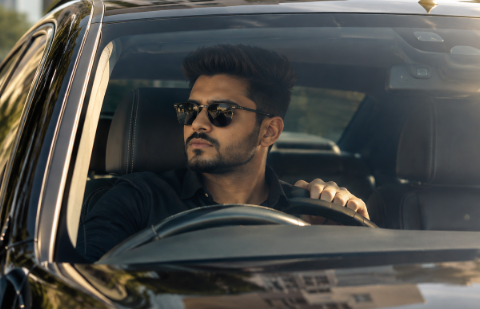
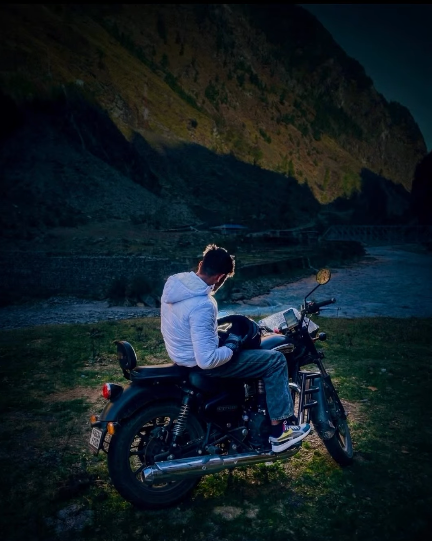
The specific style gaining massive traction right now is called the night flash cinematic look. It combines direct front flash lighting, strong rim backlighting, muted dark backgrounds, and a warm peachy skin tone. The result feels raw, editorial, and deeply cinematic.
Understanding the Night Flash Cinematic Lighting Style
Before you use any Gemini AI photo editing prompt, you need to understand what you are trying to achieve. The night flash aesthetic is rooted in real photography techniques used by editorial and street photographers.
Here is what defines this style:
Background Treatment — The background is pushed into deep, muted darkness. Shadows are crushed. Greens, blues, and earth tones are desaturated and cooled. Grain is added for a film-like texture, especially visible in darker areas.
Rim Light — A strong backlight wraps around the edges of the subject, creating a brilliant halo or rim effect. This separates the subject from the background and adds dramatic depth.
Front Flash Fill — A direct, front-facing flash lights the subject. It is not soft or diffused. It is bold and punchy, hitting the face and clothes with visible intensity while still blending with the ambient light.
Highlight Control — Tiny, precise highlights appear on edges, hair, and fabric. These are not blown out. They are controlled, adding dimension without losing detail.
Skin Rendering — Skin tones shift to a soft peachy warmth. There is no orange oversaturation. The tones feel natural but luminous under flash.
This combination is what makes the Gemini AI photo editing prompt output look so striking. It is a technically layered grade that Gemini can now apply intelligently based on a well-structured text instruction.
The Exact Gemini Prompt for Night Flash Relighting
Here is the prompt you can use directly inside Gemini to apply this cinematic night flash edit to your photo:
“Relight image. Background: Deep and muted, darker tone at the top, grainy. Lighting: Bold night-flash aesthetic combining natural light with direct front-facing flash. Tiny highlights. Strong backlighting creating a brilliant rim light around the subject, with a soft fill light from the front. Cinematic high-contrast mood. Skin rendered with gentle peachy tones. Do not change the facial structure not even a bit.”
This Gemini AI photo editing prompt works best on outdoor travel photos, portrait shots with a visible background, and candid lifestyle images. It struggles with studio-white backgrounds or images where the subject is too close to the camera with no background depth.
Why the Facial Structure Instruction Matters
Notice the last line of the prompt: “Do not change the facial structure not even a bit.”
This is a critical instruction when using Gemini or any AI image editing tool. Without this guardrail, AI models sometimes subtly reshape facial features while applying lighting changes. This can include widening the jaw, smoothing the nose bridge, or altering eye shape.
Adding this instruction keeps the edit purely photographic. The AI focuses only on lighting, color grading, and texture — not on the underlying geometry of the face. For travel creators, lifestyle photographers, and anyone editing real people, this line is non-negotiable.
How to Use This Prompt on Your Own Photos
Using this Gemini AI photo editing prompt is straightforward. Follow these steps:
Open Google Gemini at gemini.google.com and sign in with your Google account.
Upload your photo using the image attachment option in the prompt field.
Paste the full prompt exactly as written above into the text box alongside your image.
Review the output. If the background is not dark enough or the rim light appears too subtle, add a follow-up instruction such as “Darken the background further and increase the rim light intensity.”
Download the result and compare it side by side with your original.
For best results, use photos taken in outdoor daylight or golden hour with a natural background — forests, mountains, rivers, or urban streets. These environments give Gemini enough tonal range to apply the contrast-heavy night flash grade convincingly.
Why Creators Are Using AI Relighting Instead of Lightroom
Traditional photo editing for this style requires significant skill. In Lightroom or Capture One, you would need to use masking, radial gradients, HSL adjustments, and tone curve manipulation — often across multiple layers. In Photoshop, recreating a rim light means manually painting light using blend modes.
With a well-crafted Gemini AI photo editing prompt, the same result takes under a minute. This is why the trend is exploding among:
Solo travel creators who shoot and edit alone without a team
Instagram Reels editors who need bulk edits across dozens of photos
Beginner photographers who want a professional look without advanced software skills
Content agencies producing high-volume social media content
The accessibility of AI relighting is not replacing professional editors. It is expanding what solo creators can produce independently.
Tips for Getting the Best Results
Not every photo produces an equally strong result. Here are factors that improve output quality:
Subject Separation — Photos where the subject is clearly distinct from the background produce stronger rim light effects. Busy or cluttered backgrounds reduce the AI’s ability to isolate and light edges correctly.
Lighting Direction in the Original — If your original photo already has some directional light hitting the subject from one side, the AI builds on that intelligently. Flat, overcast light gives it less to work with.
Resolution — Higher resolution images produce sharper output with more visible highlight detail and grain texture.
Avoid Heavy Filters Already Applied — If your original image already has a heavy preset applied, the AI prompt may conflict with existing color grades. Start from as natural or unedited an image as possible.
Background Complexity — Simple, receding backgrounds like mountains, rivers, or open roads work beautifully. Busy urban backgrounds with many competing light sources can produce inconsistent results.
The Future of AI Photo Editing
Gemini is one of several AI tools transforming how creators approach photo editing. The ability to write a specific Gemini AI photo editing prompt and receive a photographic-grade transformation is only getting more precise. As these models improve, prompts will allow even finer control over specific zones of an image, simulating specific camera gear, lens characteristics, and lighting setups with increasing accuracy.
For now, the night flash prompt remains one of the most visually striking and widely shared results achievable through Gemini. It combines technical sophistication with aesthetic impact in a way that resonates deeply on visual platforms like Instagram and Pinterest.
Key Takeaways
The Gemini AI photo editing prompt for night flash relighting produces a cinematic, editorial look on ordinary outdoor photos.
The style combines bold front flash, strong rim backlighting, muted dark backgrounds, and warm peachy skin tones.
Always include the facial structure protection line in your prompt to prevent AI from altering physical features.
Best results come from high-resolution outdoor photos with clear subject-background separation.
Our free tool applies this prompt automatically — no manual input needed.
Conclusion
The night flash cinematic look is one of the most powerful aesthetic trends in photo editing right now. With the right Gemini AI photo editing prompt, any creator can achieve a result that looks like it was shot and graded by a professional team. Whether you paste the prompt yourself or use our free conversion tool, the process takes minutes — not hours. Try it on your next travel photo and see the difference a single prompt can make.
Frequently Asked Questions
What is the best Gemini AI photo editing prompt for cinematic results?
The most effective prompt for cinematic results combines relighting instructions with background treatment, skin tone direction, and a facial structure protection clause. The night flash prompt shared in this guide is currently one of the most shared and replicated styles on Instagram.
Can Gemini edit photos without changing facial features?
Yes, but only if you specifically instruct it not to. Adding “Do not change the facial structure not even a bit” to your Gemini AI photo editing prompt significantly reduces the likelihood of unwanted facial alterations.
Does this work on all types of photos?
This Gemini AI photo editing prompt works best on outdoor photos with natural backgrounds and a clear subject. It is less effective on flat-background studio shots or heavily filtered images.
How do I get the rim light effect using AI?
Include the specific instruction “Strong backlighting creating a brilliant rim light around the subject” in your Gemini prompt. Pair it with a dark background instruction to make the rim light visually pop in the output.
Can I use this for Reels or video thumbnails?
Absolutely. The night flash aesthetic works extremely well for YouTube thumbnails, Instagram Reels cover frames, and travel blog featured images. The high contrast and bold lighting make images instantly attention-grabbing at small sizes.