The Mercedes driving video AI prompt is one of the smoothest ways to turn a single photo into a realistic, cinematic car reel. If you have seen a video where someone sits naturally behind the wheel of a luxury car, glancing over and smiling before looking back at the road, you were likely looking at this exact AI prompt in action. In this post, you will get the full prompt, learn how to use it step by step, and turn your own photo into the same kind of clip.
You do not need any filming or editing skill to try this. You only need one clear reference photo, an AI video tool that supports image-to-video generation, and the prompt shared below.
What Is the Mercedes Driving Video AI Prompt?
This is a text prompt you pair with a reference photo inside an AI video generator. Instead of filming a real driving scene, the AI builds a short, realistic clip based on your instructions.
This particular prompt places you in the driver’s seat of a black luxury Mercedes, keeping your face, hairstyle, and skin tone consistent with your reference photo. It adds natural movement, such as a slight smile, a glance to the side, and a subtle head turn, along with realistic camera motion toward a side angle. The result looks like a short, professionally shot car commercial rather than an AI-generated clip.
How to Use This Prompt: Step-by-Step
Follow these steps to recreate this driving scene yourself.
First, choose one clear, well-lit reference photo of your face, since the AI uses this to keep your identity consistent throughout the clip.
Next, open your AI video tool and upload that photo. Copy the prompt below.
Then, paste the prompt into the chat along with your uploaded photo and generate the video.
Finally, review the result. If the motion looks slightly off, regenerate once or twice, since AI video results can vary between attempts.
Create an ultra-realistic cinematic video of the same young man sitting naturally in the driver’s seat of a black luxury Mercedes car. Keep his face exactly consistent with the reference photo, including facial features, hairstyle, skin tone and light beard. He looks naturally toward the side, smiles slightly, then looks forward while keeping one hand naturally on the steering wheel. Realistic human movement, natural blinking, subtle head movement and breathing. Show authentic car interior, steering wheel and dashboard. Camera slowly moves from a close front windshield view toward a slightly closer side angle. Realistic windshield reflections and tinted glass, natural daylight, accurate shadows, realistic skin texture, shallow depth of field, cinematic color grading, 4K, highly photorealistic, no face distortion, no extra fingers, no warped hands, no artificial-looking face. Match the reference video’s camera movement, framing, lighting, pacing and natural facial expressions. Make it look like a real camera-recorded video, not AI-generated.
Copied!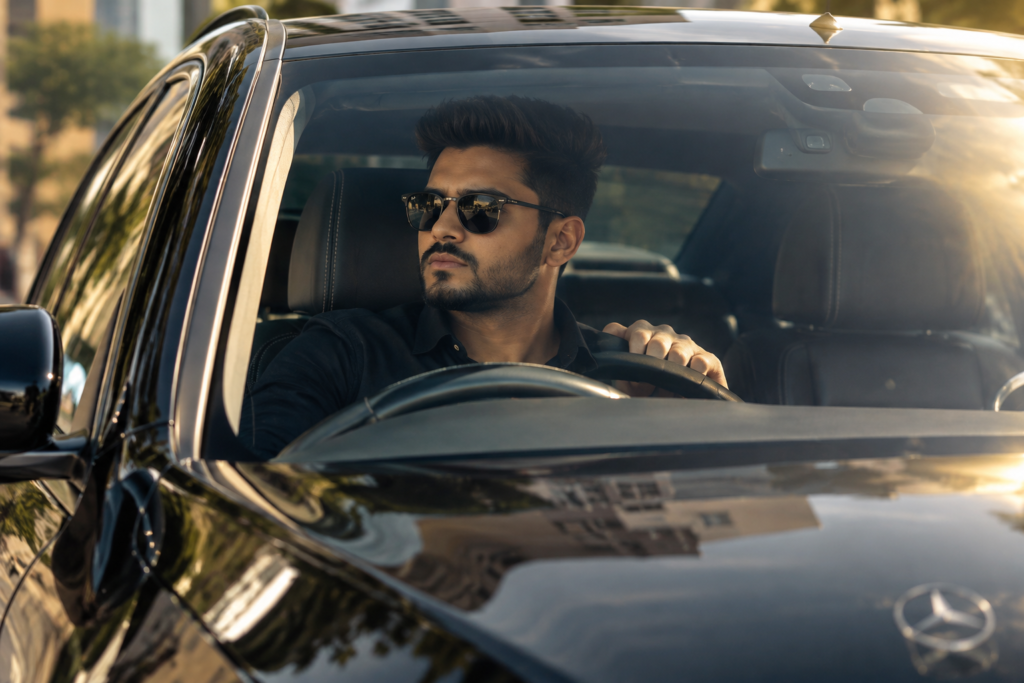
Why This AI Car Video Trend Is Going Viral
Luxury car content performs well because it signals status and a polished lifestyle in just a few seconds. Viewers respond to the calm, confident energy of someone sitting behind the wheel of a high-end car, even before any story unfolds.
Because this prompt keeps your real face consistent while placing you inside a scene most people cannot easily film themselves, it creates a believable, aspirational clip without needing access to an actual luxury car.
Tips for the Best Result
Use these tips to get a cleaner, more realistic output:
- Upload a sharp, front-facing reference photo with even lighting, since blurry or shadowed photos reduce identity accuracy.
- Keep your expression relaxed and neutral in the source photo, since the prompt adds the smile and head movement for you.
- Regenerate the clip if the hands or face look distorted, since this is the most common issue with AI-generated driving scenes.
- If your AI tool asks for a reference video instead of just a photo, a short front-facing clip of yourself looking around naturally can improve how well the final motion matches real human movement.
Common Mistakes to Avoid
First, avoid uploading a photo with sunglasses or heavy filters, since this reduces how accurately the AI preserves your face. Second, do not skip multiple generation attempts, since the first result is not always the most realistic one. Third, resist adding unrelated instructions into the same prompt, since mixing requests can confuse the AI and weaken the output quality.
Key Takeaways
- This prompt turns one reference photo into a realistic, cinematic Mercedes driving video.
- It keeps your facial identity consistent while adding natural movement, camera motion, and professional color grading.
- No filming or car access is needed, just a clear reference photo and an AI video tool.
- Regenerating once or twice usually improves realism if the first result looks off.
Conclusion
The Mercedes driving video AI prompt gives you a fast, realistic way to create a luxury car scene without ever stepping into a real vehicle. Copy the prompt, upload your reference photo, and let the AI handle the rest. Try it today and see how close you can get to a real cinematic shot.
FAQs
Is this Mercedes driving video prompt free to use?
Yes, the prompt itself is free. You only need an AI video tool that supports image-to-video generation.
Do I need an actual photo in a car to use this prompt?
No, a clear face photo is enough. The prompt builds the car interior and driving scene around your reference photo.
Why does my result look distorted?
AI video generation can occasionally distort hands or facial details. Regenerate the clip once or twice for a cleaner result.
Will the AI keep my face looking like me?
Yes, the prompt is written to prioritize facial identity. Use a clear, well-lit, front-facing photo for the most accurate result.
Can I change the car or background in the prompt?
Yes, you can edit details like the car color or model directly in the prompt text before pasting it into your AI tool.
How long does the generated video usually last?
Most AI video tools generate short clips of a few seconds, which work well for Reels or Shorts.