Maa Durga AI Video Editing Prompt – Free Devotional Edit
The Maa Durga AI video editing prompt is becoming one of the most popular ways to create devotional content for Navratri, Durga Puja, and other spiritual occasions. Using an AI video tool, you can turn an ordinary photo into a cinematic devotional video featuring glowing diyas, temple backgrounds, flowers, and divine imagery. In this post, you will get the full prompt, learn how to use it step by step, and understand how to adapt it for Instagram Reels, YouTube Shorts, and Navratri posts.
You do not need any editing experience to try this. You only need one clear photo, an AI tool that supports image-to-video generation, and the prompt shared below.
What Is a Maa Durga AI Video Editing Prompt?
A Maa Durga AI video editing prompt is a detailed text instruction you give to an AI video tool. It describes the subject, background, lighting, camera movement, colors, and overall visual style you want in the final video.
Instead of filming a real devotional scene, the AI builds a short, cinematic clip based on your photo and your written instructions. The more specific your prompt is about movement, lighting, and atmosphere, the more polished and believable the final result looks.
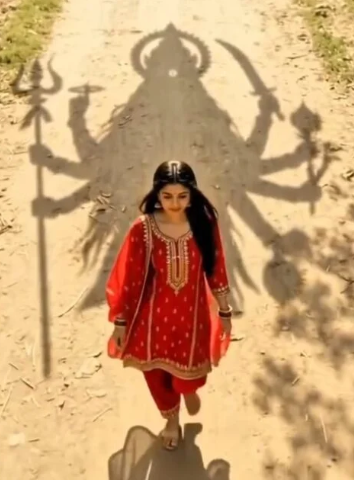
Create a cinematic, ultra-realistic 9:16vertical video using my uploaded image as the starting frame and identityreferenceSCENE & MOVEMENT:A young Indian woman wearing abeautiful bright red salwar suit withgolden embroidery and a flowing red dupatta walks slowly forward along a sunlit rural dirt pathway. Her long black hair and dupatta move gently with the breeze.The camera folows her from anextremely high, straight-down bird’s-eye drone perspective. Maintain the same overhead angle and full-bodycomposition throughout the video.As she walks forward, the gigantic divineshadow of Maa Kali follows directlybehind her across the dusty ground. MaaKali’s shadow has a majestic crown, flowing hair, multiple arms, a trident, and a sword. The shadow moves naturally in sync with the sunlight and the woman’s forward movement, creating the feeling that Maa Kali is walking alongside her and protecting her.Green tree branches sway gently, andgolden sunlight filters through the leaves, creating beautiful moving shadows across the pathway.CAMERA MOVEMENT:The drone camera slowly tracks forward, following the woman from above while maintaining a consistent distance andframing.Smooth cinematic movement, no sudden cuts, no camera shake. Theenormous shadow remains clearly visible behind her throughout the shot.TEXT REVEAL — FINAL MOMENT:As the woman continues walking, thecamera slowly pulls back to reveal more of Maa Kali’s enormous shadow.At the final moment, introduce the exact Hindi text:मां आा रही हैThe text appears dramatically over theground in elegant, glowing goldenDevanagari lettering, with a subtle divine golden shimmer and soft light rays. The text fades in smoothly as the musicreaches its emotional climax.Keep the text perfectly spelled, clear,readable, and centered in theupper-middle portion of the framewithout covering the woman or the most recognizable part of Maa Kali’s shadow.AUDIO S ATMOSPHERE:Powerful devotional cinematicbackground music with deep templebells, a subtle damru rhythm, atmospheric wind, and a rising spiritual soundscape. Build anticipation toward the final text reveal.
How to Use This Prompt: Step-by-Step
Follow these steps to create this devotional AI video.
First, choose a clear, high-resolution image to use as your base, since sharper source photos generally produce better results.
Next, open an AI-supported image-to-video tool and upload your image. Copy the prompt below and paste it into the tool along with your photo.
Then generate the video, review the result, and regenerate if needed. Finally, add devotional music or a Navratri audio track and export the video in a vertical format for social media.
Devotional AI Video Prompt
Create a cinematic, ultra-realistic 9:16 vertical video using my uploaded image as the starting frame and identity reference.
SCENE & MOVEMENT:
A young Indian woman wearing a beautiful bright red salwar suit with golden embroidery and a flowing red dupatta walks slowly forward along a sunlit rural dirt pathway. Her long black hair and dupatta move gently with the breeze.
The camera follows her from an extremely high, straight-down bird’s-eye drone perspective. Maintain the same overhead angle and full-body composition throughout the video.
As she walks forward, the gigantic divine shadow of Maa Kali follows directly behind her across the dusty ground. Maa Kali’s shadow has a majestic crown, flowing hair, multiple arms, a trident, and a sword. The shadow moves naturally in sync with the sunlight and the woman’s forward movement, creating the feeling that Maa Kali is walking alongside her and protecting her.
Green tree branches sway gently, and golden sunlight filters through the leaves, creating beautiful moving shadows across the pathway.
CAMERA MOVEMENT:
The drone camera slowly tracks forward, following the woman from above while maintaining a consistent distance and framing. Smooth cinematic movement, no sudden cuts, no camera shake. The enormous shadow remains clearly visible behind her throughout the shot.
TEXT REVEAL — FINAL MOMENT:
As the woman continues walking, the camera slowly pulls back to reveal more of Maa Kali’s enormous shadow.
At the final moment, introduce the exact Hindi text: मां आ रही है
The text appears dramatically over the ground in elegant, glowing golden Devanagari lettering, with a subtle divine golden shimmer and soft light rays. The text fades in smoothly as the music reaches its emotional climax.
Keep the text perfectly spelled, clear, readable, and centered in the upper-middle portion of the frame without covering the woman or the most recognizable part of Maa Kali’s shadow.
AUDIO & ATMOSPHERE:
Powerful devotional cinematic background music with deep temple bells, a subtle damru rhythm, atmospheric wind, and a rising spiritual soundscape. Build anticipation toward the final text reveal.
Adapting This Prompt for Instagram Reels
Instagram Reels perform especially well with vertical video, so keep the 9:16 aspect ratio when generating your clip. Focus on visually strong elements such as warm golden lighting, glowing diyas, flowers, and temple decorations.
Keep your main subject clearly visible throughout the video, and avoid adding too many distracting objects, since this can reduce the visual impact of the final reel.
Adapting This Prompt for Navratri
Navratri is one of the best occasions for a devotional AI video like this one. You can combine traditional Indian decorations with cinematic effects by adding elements such as colorful rangoli, marigold flowers, diyas, temple bells, red chunri, golden ornaments, incense smoke, and softly illuminated temple lighting.
You can also generate a different video for each day of Navratri using a different visual theme, and add a short devotional message or festival greeting at the end to make it easy to share with family and friends.
Tips for Better AI Devotional Videos
Keep your prompt detailed but organized, clearly stating the subject, environment, lighting, camera movement, and aspect ratio. Use a high-quality, well-lit source image whenever possible. If you are animating an existing photo, describe only the movement you want added, such as slow camera motion or floating petals, rather than asking the AI to redesign the whole scene. Generate a few versions and pick the one with the most natural movement and detail.
Common Mistakes to Avoid
First, avoid vague prompts that only list a few words, since the AI needs specific detail about lighting, movement, and atmosphere to produce a polished result. Second, do not skip reviewing the generated video before exporting, since occasional distortions or mistimed text reveals are common in AI video generation. Third, resist overcrowding the scene with too many effects at once, since a few well-placed elements usually look more cinematic than many competing ones.
Key Takeaways
A Maa Durga AI video editing prompt turns a single photo into a cinematic devotional video using detailed text instructions. The prompt above uses a bird’s-eye drone shot, a divine shadow, and a golden Hindi text reveal for a dramatic effect. This style adapts well for Navratri, Durga Puja, and general devotional Reels or Shorts content. Specific, detailed prompts about lighting, movement, and camera angle produce the most polished results.
Conclusion
A well-written devotional AI video prompt can turn a simple photo into an impressive, cinematic Navratri or Durga Puja video without any filming or advanced editing skill. Copy the prompt above, upload your photo, and adjust the details to match your own creative vision. Try it today and see how much impact a detailed, well-structured prompt can have on your devotional content.
FAQs
Is this Maa Durga AI video editing prompt free to use?
Yes, the prompt itself is free. You only need an AI tool that supports image-to-video generation.
Why does the prompt mention Maa Kali if this post is about Maa Durga?
This specific prompt example uses a Maa Kali shadow effect. You can adapt the wording to reference Maa Durga’s imagery instead if you want the video to match the goddess more precisely.
Do I need a photo of a temple or idol to use this prompt?
No, a clear photo of a person is enough. The prompt builds the pathway, shadow, and devotional atmosphere around your uploaded image.
Can I use this prompt for other festivals besides Navratri?
Yes, the same structure works for Durga Puja, general devotional posts, or any spiritual occasion by adjusting the text reveal and visual details.
Why does my generated text look misspelled or distorted?
AI video tools can occasionally struggle with on-screen text. Regenerate the video once or twice, or add “no spelling errors” and “clear readable text” more explicitly in the prompt.
What aspect ratio should I use for Instagram Reels?
Use a 9:16 vertical aspect ratio, which is already specified at the start of this prompt.