Are you obsessed with those dreamy, cinematic Manali reels flooding your Instagram feed? The secret behind most of those viral snow edits is one powerful tool — the Manali Reel Edit VN Template. In this guide, you get the exact VN template code, a step-by-step tutorial, and pro tips to make your Manali travel reel go viral in 2026.
Whether you visited the snow-capped valleys of Manali or simply want that aesthetic winter vibe, this VN template will transform your raw clips into a cinematic masterpiece — in under 5 minutes.
What Is the Manali VN Template and Why Is It Viral?
The Manali VN Template is a pre-built video editing template available inside the VN Video Editor app. It features smooth transitions, bold typography, snow-synced cuts, and a cinematic color grade — all designed to match the rugged, breathtaking aesthetic of Manali, Himachal Pradesh.
This specific template — created by @kanishkacapturez — uses the song “Testify” and is a 16-second, 19-clip edit. It has been widely used by travel creators, Instagrammers, and vloggers to showcase their Manali trips in a high-impact, emotionally engaging way.
Why is it going viral in 2026?
- Snow + bold text overlays = cinematic drama
- Short format (16 seconds) = perfect for Instagram Reels & YouTube Shorts
- Easy to use — no editing skills needed
- Free VN template code available via QR scan
Key Takeaways
Before diving in, here’s what you’ll learn in this post:
- ✅ What the Manali VN Template is and how it works
- ✅ How to scan and use the VN template QR code
- ✅ Step-by-step guide to filling in your own clips
- ✅ Pro tips to make your reel stand out
- ✅ Common mistakes to avoid
- ✅ Best clips to use for maximum impact
How to Use the Manali Reel Edit VN Template – Step-by-Step
Follow these simple steps to create your own viral Manali reel using this VN template code.
Step 1 – Download the VN Video Editor App
First, download the VN Video Editor app on your smartphone.
- Available on iOS (App Store) and Android (Google Play)
- It’s completely free with no watermark
- VN is trusted by 200M+ creators globally
Step 2 – Save the Template QR Code Image
Save the Manali VN Template image (the one with the QR code) directly to your phone’s photo gallery.
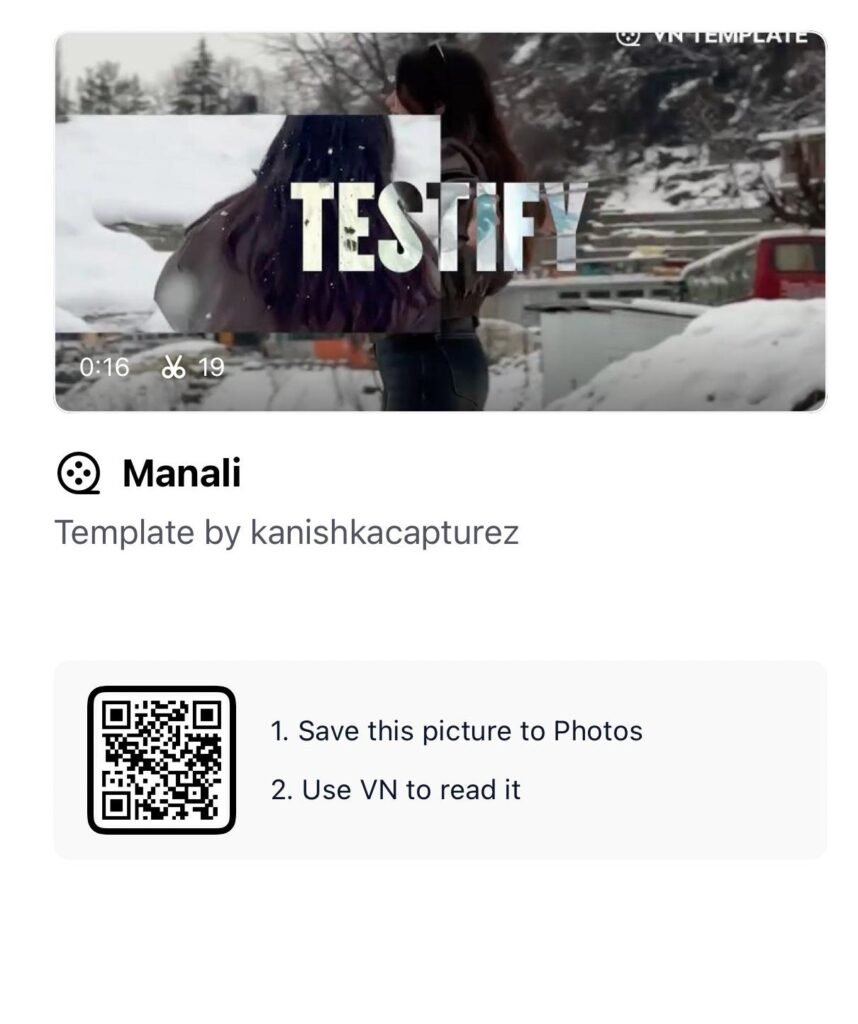
Step 3 – Scan the QR Code Inside VN App
Open the VN app. Follow these steps:
- Tap on the “Templates” section at the bottom
- Look for the QR scan icon (top right corner)
- Tap it and select “Album”
- Choose the saved template image from your gallery
- VN will automatically detect and load the template
Step 4 – Add Your Manali Clips
Once the template loads, you’ll see 19 placeholder slots. This is where your magic begins.
- Add your best Manali video clips or photos
- Match the duration hint shown for each slot
- Use clips that show snow, mountains, roads, or candid moments
- Prioritize portrait or vertical footage for Reels
Step 5 – Preview and Export
Once all clips are added:
- Tap Preview to watch your reel
- Adjust clip timing if needed
- Export in 1080p or 4K for best quality
- Share directly to Instagram, YouTube Shorts, or WhatsApp Status
Best Types of Clips to Use for This Manali VN Template
The template uses bold, dramatic transitions. Your clips need to match that energy. Here are the best types of footage to use:
| Clip Type | Why It Works |
|---|---|
| Walking on snowy road | Matches the “moving” transition style |
| Hair flying in wind | Creates cinematic drama |
| Mountain wide shots | Adds scale and depth |
| Close-up of snow | Matches the color grade perfectly |
| Café or bonfire scenes | Adds warmth contrast |
| Bike riding in snow | High energy — great for beat drops |
| Candid laughing moments | Adds emotional connection |
Pro Tip: Use clips shot in natural daylight or golden hour for the best color match with this template’s grade.
Why VN App Is the Best Free Editing Tool for Travel Reels
The VN Video Editor stands apart from other apps for one key reason — it supports template-based editing with QR codes. This means creators can share entire edit styles with others in seconds.
Here’s why travel creators swear by VN:
- No watermark — unlike CapCut
- QR template sharing — unique and powerful
- Professional transitions — smooth cuts and overlays
- Audio sync — auto beat matching on select templates
- Multi-layer timeline — for advanced edits
For your Manali snow reel edit, VN’s template ecosystem is unmatched in 2026.
Pro Tips to Make Your Manali Reel Go Viral
Simply using the template isn’t enough. Here’s how to stand out:
1. Use Original Footage Don’t use stock clips. Authentic Manali footage — your own face, your own trip — performs 3x better on Instagram.
2. Add a Caption That Triggers Emotion Try captions like “Worth every kilometer” or “Left my heart in Manali.” Emotional captions drive saves and shares.
3. Post at Peak Hours Best time to post Reels in India: 7–9 PM IST on weekdays, 11 AM–1 PM on weekends.
4. Use Trending Hashtags Include tags like: #ManaliTrip #VNTemplate #TravelReel #ManaliEdit #InstagramReels2026 #SnowEdit #HimachalPradesh
5. Hook in the First 2 Seconds Your most dramatic clip — a snow throw, a mountain reveal — goes in slot 1. Make viewers stop scrolling instantly.
Common Mistakes to Avoid With VN Templates
Many creators make these errors. Avoid them:
- ❌ Using blurry or shaky clips — ruins the cinematic look
- ❌ Adding too many text overlays — clutter kills aesthetics
- ❌ Ignoring clip duration hints — causes awkward transitions
- ❌ Exporting in low resolution — always use 1080p minimum
- ❌ Not previewing before export — always check once
Conclusion + Call to Action
The Manali Reel Edit VN Template is your shortcut to creating stunning, cinematic travel content — even without advanced editing skills. With just 19 clips, a QR scan, and the free VN app, your Manali memories become a viral-worthy reel.
Stop sitting on your travel footage. Download VN today, scan the template QR code, and drop your Manali reel this week.
If this guide helped you, bookmark this page, share it with your travel crew, and check out more editing tutorials below.
Q1. What is the Manali VN Template code and how do I use it?
The Manali VN Template is a QR-based editing preset inside the VN Video Editor app. Save the template image to your gallery, open VN, scan the QR via the Templates section, and add your own clips.
Q2. Is the VN app free for editing Manali reels?
Yes. VN Video Editor is 100% free with no watermark. It’s available on both Android and iOS and supports template-based editing.
Q3. How many clips does the Manali VN template need?
This specific Manali template by kanishkacapturez requires 19 clips and creates a 16-second reel set to the song “Testify.”
Q4. Can I use photos instead of videos in this VN template?
Yes, VN templates support both photos and video clips. However, video clips with movement look significantly better in motion-based templates.
Q5. Which song is used in the Manali VN Template?
The template uses the track “Testify.” The audio is pre-embedded in the template when you scan the QR code.