Are you looking for the Voices in My Head Go VN Template with 31 clips? You’re in the right place! This trending VN template is going absolutely viral on Instagram Reels and has captured the attention of thousands of creators worldwide. In this post, we’ll give you the complete free QR code download, a step-by-step guide on how to use it, and tips to make your reel go viral using VN Video Editor.
What Is the “Voices in My Head Go” VN Template?
The “Voices in My Head Go VN Template” is one of the most viral video editing templates of 2025. It is based on the popular trending audio track and features a fast-paced, multi-clip slideshow editing style that syncs perfectly to the beat. This template uses 31 clips, giving you plenty of room to showcase your best photos and videos in one cinematic reel.
The template has been trending because of its:
- ⚡ Fast beat-sync transitions that make every clip pop
- 🎬 31 clip slots — perfect for travel, friendship, couple, and lifestyle edits
- 🎨 Pre-applied color grading and smooth overlay effects
- 📱 9:16 aspect ratio optimized for Instagram Reels, YouTube Shorts & WhatsApp Status
Whether you’re a beginner or a pro creator, this VN template makes editing as simple as scanning a QR code and dropping in your clips.
Voices in My Head Go VN Template QR Code – Free Download
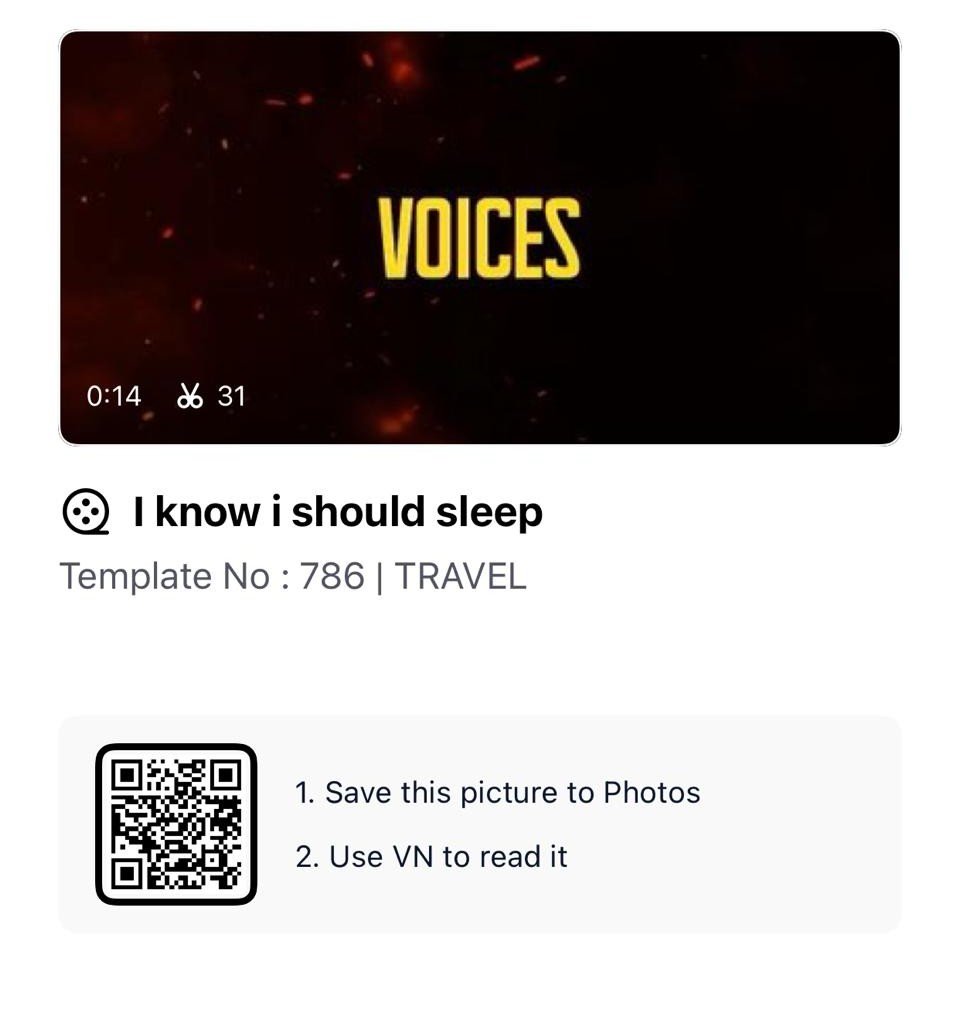
Once you scan the QR code image, follow the steps below to import it into your VN app instantly.
Template Details
| Feature | Details |
|---|---|
| Template Name | Voices in My Head Go |
| Total Clips | 31 Clips |
| Aspect Ratio | 9:16 (Vertical) |
| Best For | Instagram Reels, YouTube Shorts, WhatsApp Status |
| Editing Style | Beat Sync, Fast Transitions, Slideshow |
| App Required | VN Video Editor (Free) |
| Download Type | QR Code (Free) |
How to Use the Voices in My Head Go VN Template
Using this VN template is extremely easy — even if you’ve never edited a video before. Just follow these simple steps:
Step 1: Download the QR Code
Click the download button above and save the QR code image to your phone’s gallery.
Step 2: Open VN Video Editor
If you don’t have the VN app installed yet, download it for free from the Google Play Store or Apple App Store. It is 100% free with no watermarks.
Step 3: Scan the QR Code
- Open the VN app
- Tap the three-dot menu (⋮) in the top right corner
- Select “Scan QR Code”
- Import the QR code image from your gallery
Step 4: The Template Loads Automatically
The template will load directly into your VN editor with all the transitions, effects, color grading, and beat-synced timing already pre-applied.
Step 5: Add Your 31 Clips
Replace the placeholder slots with your own 31 photos or video clips. You can use travel clips, couple moments, friendship memories, gym edits, or any content you like.
Step 6: Export and Post
Export your video in 1080p at 30fps for the best quality. Then upload directly to Instagram Reels, YouTube Shorts, or WhatsApp Status!
Why Is the Voices in My Head Go Template Trending?
The “Voices in My Head Go” trend originated on TikTok and Instagram and blew up rapidly due to its highly relatable audio and the satisfying fast-cut visual format. Creators have been using this template to showcase:
- 🌏 Travel montages — showing multiple destinations in one viral reel
- 💑 Couple edits — romantic highlight reels synced to the emotional beat
- 👫 Friend group videos — capturing memories and throwbacks
- 💪 Fitness/gym transformation reels — showcasing workout progress
- 🌸 Aesthetic lifestyle content — curated photo slideshows
The 31-clip format is particularly popular because it gives creators the freedom to tell a longer visual story without making the reel feel boring or slow.
Pro Tips to Make Your Reel Go Viral
Using the right template is just the first step. Here are some pro tips from our editors at vntemplatescode.in to maximize your reach:
- Use high-quality clips – Always use the clearest, most visually appealing photos and videos. Even the best template can’t save blurry footage.
- Match the mood to the audio – The “Voices in My Head Go” track has an intense, fast energy. Match it with clips that are action-packed or emotionally charged.
- Don’t skip the beat drop – Make sure your most impactful clip lands exactly on the beat drop for maximum viewer impact.
- Post at peak hours – Upload between 7 PM and 10 PM in your local timezone for the highest initial engagement.
- Use trending hashtags – Include hashtags like
#VNTemplate,#VoicesInMyHeadGo,#InstagramReels,#VNVideoEditor, and#ViralReelin your caption. - Add a compelling caption – Ask your audience a question or create curiosity to boost comments and shares.
Frequently Asked Questions (FAQs)
Q1. Is the Voices in My Head Go VN Template free to download?
Yes! The QR code provided on this page is completely free to download and use for personal content creation, Instagram Reels, YouTube Shorts, and WhatsApp Status.
Q2. How many clips does this VN template have?
This template features exactly 31 clips, giving you a generous number of slots to fill with your best photos and video clips.
Q3. Which app do I need to use this VN template?
You need the VN Video Editor app, which is available for free on both Android (Google Play Store) and iOS (Apple App Store). No subscription is required.
Q4. Can I use this template on iPhone?
Yes! The VN app and this QR code template are compatible with both Android and iOS devices.
Q5. What is the best aspect ratio for this template?
Keep your videos in 9:16 vertical format for the best results on Instagram Reels, YouTube Shorts, and TikTok.
Q6. Can I customize the template after scanning?
Absolutely! After importing the template via QR code, you can reposition clips, adjust timing, change the speed of individual clips, and even swap out the music if you prefer a different track.
Q7. The QR code is not working — what should I do?
Make sure you have the latest version of the VN app installed. If the problem persists, try downloading the QR code image again and re-importing it. You can also [contact us] for support.
Final Thoughts
The Voices in My Head Go VN Template (31 Clips) is hands down one of the most exciting and viral-worthy VN templates of 2025. Its fast-paced beat sync, generous 31-clip layout, and stunning pre-applied effects make it perfect for creators of all levels — from beginners to pro editors.
Download your free QR code today, fire up the VN Video Editor, and start creating a reel that gets the engagement it deserves. Don’t forget to bookmark vntemplatescode.in for daily updates on the latest trending VN templates, QR codes, and video editing tips!