The page opened fine. I left out these items from it: the image caption “Badhwa Aail Ba” (it does not match the page title), the other templates listed on the page such as “Maiya Darbar”, and the typos “cab cut” and “CupCut”. The page also says to add “as many clips as you need” while saying the template takes a single clip. I kept it generic and told you to follow the CapCut preview.
Intro
The Navratri Bhojpuri CapCut template is a devotional video edit in Bhojpuri style. It suits Navratri reels for Instagram and YouTube Shorts. No editing skill is needed. Add your clip, and CapCut sets the music, filters and effects for you.
What Is the Navratri Bhojpuri CapCut Template?
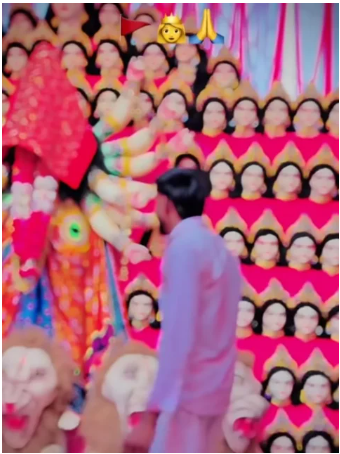
It is a ready-made CapCut template with the whole edit already set. The video builds suspense with a dramatic opening effect. Then the picture clears and cinematic filters and video effects take over. The preview shows a person lip-syncing to a Bhojpuri devotional track in praise of the Mother Goddess. Emojis appear at the top of the frame.
Your clip gets the same style once you add it.
Why Is It Popular?
- Navratri videos get strong attention on social media every festive season.
- The dramatic opening makes viewers stop scrolling.
- Cinematic filters give a simple clip a festive, polished look.
- The Bhojpuri devotional sound connects with a large audience.
- The Navratri Bhojpuri CapCut template saves hours of manual editing.
Template Details at a Glance
- Template name: Navratri Bhojpuri CapCut Template
- App: CapCut (Android and iPhone)
- Style: Bhojpuri devotional, cinematic filters, dramatic intro
- Input: Video clip (check the slot count in the CapCut preview)
- Best for: Navratri reels, Instagram Reels, YouTube Shorts, WhatsApp Status
- Difficulty: Easy
- Price: Free to open. Some CapCut tools may need a paid plan.
How to Use the Navratri Bhojpuri CapCut Template
- Install CapCut and update it to the latest version.
- Open the template link: [ADD YOUR TEMPLATE LINK HERE]
- The link opens in CapCut and shows the preview.
- Tap Use Template.
- Add your clip from the gallery.
- Tap Next and wait while CapCut builds the video.
- Check the preview.
- Tap Export and save the video.
Search option: Open CapCut, go to the Discover tab and search “Navratri Bhojpuri”. Open the template that matches the preview.
If the Template Does Not Open
- Update CapCut from your app store.
- Some templates are limited in certain regions. CapCut sets this limit.
- Try again after some time.
- Open the link from your phone’s browser and choose CapCut.
- Clear the CapCut cache and restart the app.
Tips for the Best Result
- Use a clear, well-lit clip. Festive lighting and bright outfits look great.
- Record in vertical (9:16) format.
- Keep your face and upper body in the frame, as the template shows a lip-sync style.
- Use a steady clip, not a shaky one.
- Keep your look and background simple and respectful for a devotional theme.
- Preview the full video before you export.
Common Mistakes to Avoid
- Using a dark or blurry clip.
- Using a horizontal clip that gets cropped.
- Skipping the CapCut update.
- Using clips or photos of others without permission. Use only videos and photos you own or have permission to use.
- Using the edit in a way that could hurt religious feelings. Keep the tone respectful.
- Exporting before checking the preview.
Key Takeaways
- It is a Bhojpuri devotional template with cinematic filters.
- It needs one clip, as shown in the preview.
- A bright, vertical, steady clip works best.
- Update CapCut if the link does not open.
- Use only media you have permission to use.
Conclusion
The Navratri Bhojpuri CapCut template gives you a festive, polished reel in a few taps. Pick a clear clip, add it and export. Preview it once, then share it with friends and family. Visit again for more trending CapCut templates.
Disclaimer
We are not affiliated with CapCut. All trademarks, logos and templates belong to their respective owners. We only share publicly available template links.
FAQs
1. What is the Navratri Bhojpuri CapCut template?
It is a Bhojpuri devotional template with a dramatic intro, cinematic filters and effects set to music.
2. Is it free to use?
Yes, you can open and use it for free. A few CapCut tools may need a paid plan.
3. How many clips can I add?
The preview shows a single clip. Check the slot count inside CapCut before you add media.
4. Do I need editing skills?
No. CapCut edits the video after you add your clip.
5. Why is the template not opening?
It is usually an old app version or a region limit. Update CapCut and try again later.
6. Can I post it on Instagram and YouTube Shorts?
Yes. Export it and upload. Use only clips you own or have permission to use.
External links
- CapCut official site: https://www.capcut.com
- CapCut on Google Play: https://play.google.com/store/apps/details?id=com.lemon.lvoverseas