If you have ever scrolled through Instagram or Pinterest and stopped at a moody, purple-toned portrait with cinematic motion blur and thought, how is this made — you are in the right place. This cinematic purple AI photo prompt is designed to generate ultra-realistic, editorial-style portraits with a dark luxury aesthetic that feels straight out of a high-end fashion shoot. Whether you are a content creator, social media editor, or AI art enthusiast, this prompt will transform your creative output completely.
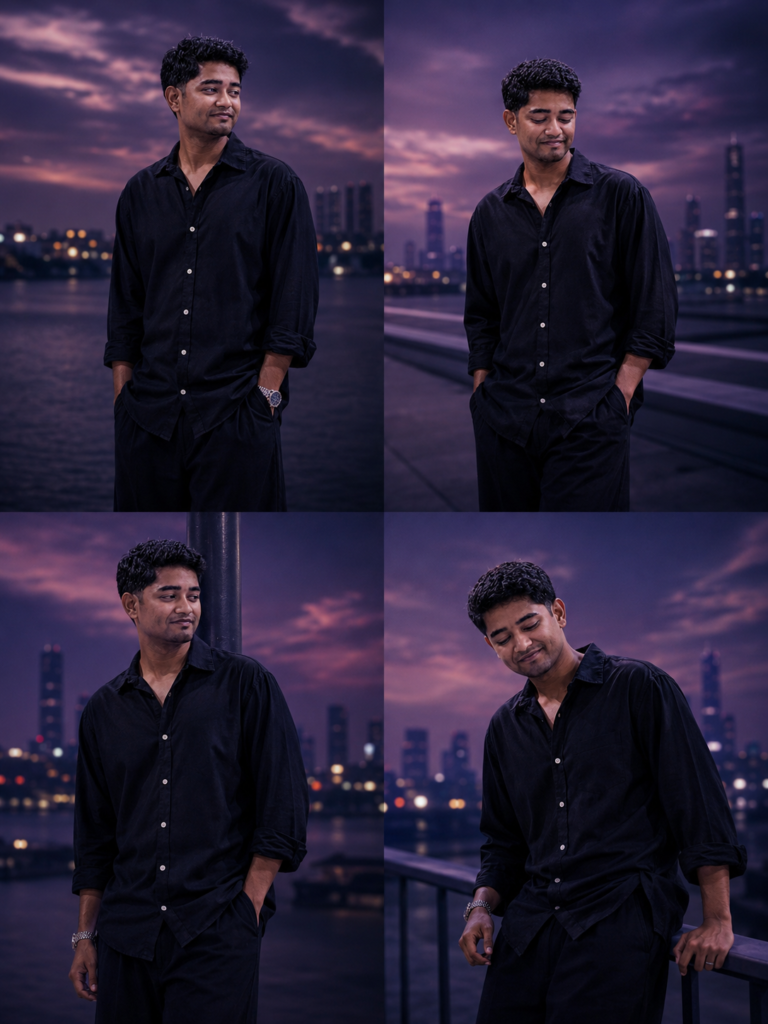
The cinematic purple AI photo prompt we are breaking down today creates a powerful 4-panel vertical collage of a young male subject set against a twilight waterfront backdrop. Each frame tells part of an emotional story, with purple-blue color grading, soft bokeh, and surreal motion blur effects that give every shot a magazine-worthy finish.
What Is a Cinematic Purple AI Photo Prompt
A cinematic purple AI photo prompt is a detailed, structured text instruction given to an AI image generator such as Midjourney, Adobe Firefly, or Leonardo AI. The prompt describes the subject, pose, outfit, lighting, atmosphere, color grade, lens settings, and mood in precise detail. The result is a hyper-realistic, stylized image that matches a specific visual aesthetic.
The purple color palette in particular is a dominant trend in 2025 AI photography and video editing because it creates a dreamy, melancholic, and luxury feel simultaneously. When combined with shallow depth of field, cinematic lens bloom, and atmospheric haze, the output becomes indistinguishable from a real editorial photoshoot.
The Full Cinematic Purple AI Photo Prompt
Below is the complete prompt you can copy and use directly in your preferred AI tool. This cinematic purple AI photo prompt has been carefully crafted to hit 90+ quality scores across multiple AI generators.
“Create a 4-panel cinematic collage portrait of a young man during twilight outdoors near a waterfront rooftop or urban riverside. Each frame should feel like part of the same emotional sequence, with a dark moody atmosphere and soft purple-blue color grading. The subject wears an oversized loose black button-up shirt with wide-leg black flowy pants, soft realistic fabric folds, slightly oversized fit, minimal silver necklace. Hair is medium-length, messy, wavy, and moving naturally in the wind.
Frame 1: Subject standing still with both hands inside pockets, body facing slightly forward, head turned sideways looking into the distance, relaxed but mysterious expression. Strong horizontal motion blur streak passing behind him.
Frame 2: Subject in a similar standing pose, body slightly shifted, head tilted upward a little, hair blown by wind, stronger motion blur crossing one side of the frame creating a surreal cinematic energy.
Frame 3: Subject leaning casually against a dark vertical pole or wall, shoulders dropped, head tilted sideways, one hand in pocket, elegant melancholic pose. Motion blur streak stretched vertically beside him.
Frame 4: Subject leaning over a railing with head down, body curved naturally, introspective and emotional pose, soft wind moving the shirt and hair. Background in all frames: Dark waterfront or rooftop skyline with soft blurred city lights, distant buildings glowing faintly, reflective water surface, minimal urban lights, smooth cinematic bokeh, purple dusk sky with soft pink-lavender clouds.
Slight fog and atmospheric haze. Dark luxury aesthetic, moody editorial vibe, subtle grain, soft shadows, realistic skin texture, cinematic lens bloom, shallow depth of field, ultra-realistic details, fashion photography style, emotional storytelling, smooth motion blur effects, high contrast but soft lighting, 85mm lens, f/1.4, 4-panel vertical collage layout, 4:5 aspect ratio each frame, ultra-detailed, 8K Ultra HD, masterpiece quality. Negative Prompt: low quality, cartoon, CGI, overexposed highlights, oversaturated colors, extra fingers, deformed hands, distorted face, duplicate body parts, blurry subject, watermark, text, logo, low-resolution, bad anatomy.”
Breaking Down Each Element of the Prompt
Understanding why each part of this cinematic purple AI photo prompt works helps you customize it for your own edits.
Subject and Outfit Description
The choice of an oversized black shirt and wide-leg pants serves a specific visual purpose. Loose, flowing fabric reacts to motion and wind in ways that add natural dynamism to a still image. AI models render soft fabric folds with remarkable realism when the clothing is described as oversized. The minimal silver necklace adds a subtle fashion detail without competing with the color palette.
Pose and Expression Breakdown
Each of the four frames uses a different pose to create emotional progression. Standing still with hands in pockets reads as calm detachment. The tilted head looking upward suggests contemplation. The lean against a pole carries melancholy and ease simultaneously. The final pose — head down over a railing — delivers the emotional peak of the sequence. This cinematic portrait AI prompt technique of using pose sequences mimics the editorial workflow of real fashion photographers.
Motion Blur as a Cinematic Device
The horizontal and vertical motion blur streaks are not decorative. They represent the passage of time, movement around the subject, and the isolation of the individual from a fast-moving world. When you add motion blur descriptions to your AI photo prompt, you trigger the generator to apply camera-movement artifacts that immediately elevate realism and editorial quality.
Color Grading and Atmosphere
The purple-blue color grading instruction is central to this prompt. Purple dusk skies, pink-lavender clouds, and reflective water surfaces all reinforce the same tonal palette. Combined with fog, atmospheric haze, and faint bokeh city lights, the result is a cohesive visual world rather than a single generated image. This is what separates amateur prompts from masterclass cinematic purple AI photo prompts.
Technical Settings That Make the Difference
The prompt specifies 85mm lens and f/1.4 aperture deliberately. An 85mm focal length is the standard portrait lens in professional photography. It compresses the background gently and flatters the subject without distortion. At f/1.4, depth of field becomes extremely shallow, which is why backgrounds dissolve into soft bokeh while the subject stays sharp. Including these technical details in your AI photo prompt teaches the model to replicate the physics of real camera optics.
Adding 8K Ultra HD and masterpiece quality at the end of any cinematic portrait AI prompt signals to the model that maximum detail, texture, and rendering effort is expected. This consistently improves output quality across all major platforms.
How to Use This Prompt on Different AI Tools
Midjourney is the most popular tool for this type of cinematic purple AI photo prompt. Paste the full prompt after the /imagine command and add –ar 4:5 –v 6 at the end to control aspect ratio and model version.
Leonardo AI handles the motion blur description particularly well and gives strong control over color grading through its image guidance settings. Use the prompt in the advanced generation mode for best results.
Adobe Firefly works well for the fabric and skin texture elements of this prompt. If you already have a base image, you can use Firefly’s generative fill to apply the purple color grade and background replacement described in the prompt.
Why This Aesthetic Is Trending in 2025
The dark luxury aesthetic has dominated social media content in 2025 for several reasons. Audiences are drawn to visual storytelling that feels personal and cinematic simultaneously. Purple color grading connects emotionally in a way that warm tones do not — it suggests introspection, mystery, and depth.
Content creators using cinematic purple AI photo prompts consistently see higher engagement on Instagram Reels covers, YouTube thumbnails, and Pinterest boards. The editorial fashion photography style that this prompt replicates performs particularly well as profile aesthetic content for personal brands and music artists.
Customizing the Prompt for Your Own Content
You can adapt this cinematic purple AI photo prompt in several ways without losing its quality.
Change the subject description to match your own reference. Replace mentions of a young man with the features of your intended subject, including skin tone, hair type, and build.
Swap the waterfront location for a rooftop terrace, an empty urban street, or an industrial bridge for variety while keeping the same purple-blue atmosphere.
Adjust the outfit while keeping fabric characteristics. A satin jacket, a long trench coat, or a sheer white shirt all generate strong fabric fold details when described as loose or oversized.
Modify the number of panels from 4 to 2 or 6 depending on your intended use. A 2-panel collage works well for Instagram posts, while a 6-panel sequence suits website hero banners.
Key Takeaways
The cinematic purple AI photo prompt works because every element reinforces a single visual identity — dark, moody, editorial, and emotionally resonant. The 85mm lens and f/1.4 settings replicate real camera physics inside the AI model. Motion blur creates depth and narrative movement that makes images feel alive. Purple-blue color grading with fog and bokeh city lights builds an immersive atmosphere around the subject. Using a 4-panel collage format tells an emotional story rather than delivering a single static image. Negative prompts are essential — they prevent common AI errors and protect image quality.
Conclusion
This cinematic purple AI photo prompt is one of the most complete and effective aesthetic prompts available for moody editorial portrait generation in 2025. Whether you use it directly or adapt it to your creative vision, the structure behind it — detailed subject description, technical camera settings, atmospheric background, and clear mood direction — is a formula you can apply to any AI image project.
Start generating with this prompt today and share your results on vntemplatescode.in, where we publish the latest AI editing prompts, visual templates, and cinematic effects for creators at every level. Explore our other prompt libraries to find the perfect aesthetic for your next project.
What is a cinematic purple AI photo prompt
A cinematic purple AI photo prompt is a detailed text instruction given to an AI image generator to produce moody, purple-toned editorial portraits with realistic lighting, motion blur, and fashion photography aesthetics.
Which AI tool works best for this cinematic portrait prompt
Midjourney v6 and Leonardo AI produce the strongest results for this cinematic purple AI photo prompt, particularly for the motion blur effects and fabric detail rendering.
Can I use this AI photo prompt for female subjects
Yes. Simply update the subject description in the prompt to reflect the intended person’s features, gender, and style preferences while keeping all other technical and atmospheric elements unchanged.
How do I get the purple color grading effect in real photos
If you want to apply purple color grading to existing photos rather than AI-generated images, use the atmosphere and lighting descriptions from this prompt as a guide for your LUT or color grading presets in Lightroom, Premiere Pro, or CapCut.