Devotional AI art is having a moment, and this Shiv Abhishek AI prompt is one reason why. It turns a simple text description into a temple scene so realistic it looks like a photograph. Instead of hiring a photographer or styling a real shoot, you can generate this entire moment with one prompt. In this guide, you will learn exactly what the prompt means, which AI tool renders it best, and how to get a flawless result on your first try.
What Is Shiv Abhishek, and Why This AI Portrait Trend Is Growing
Shiv Abhishek, also called Rudrabhishek, is a sacred Hindu ritual. Devotees pour water, milk, or other holy substances over a Shiva Lingam while chanting mantras.
This act symbolizes purification and surrender to the divine. Bel leaves and flowers are placed on the Lingam as offerings, since both are considered sacred to Lord Shiva.
Because this ritual is so visually rich, it has become a favorite subject for AI portrait generation. Creators now recreate the scene digitally, especially around Maha Shivratri, the Sawan month, and Mondays, which are traditionally considered auspicious for Shiva worship.
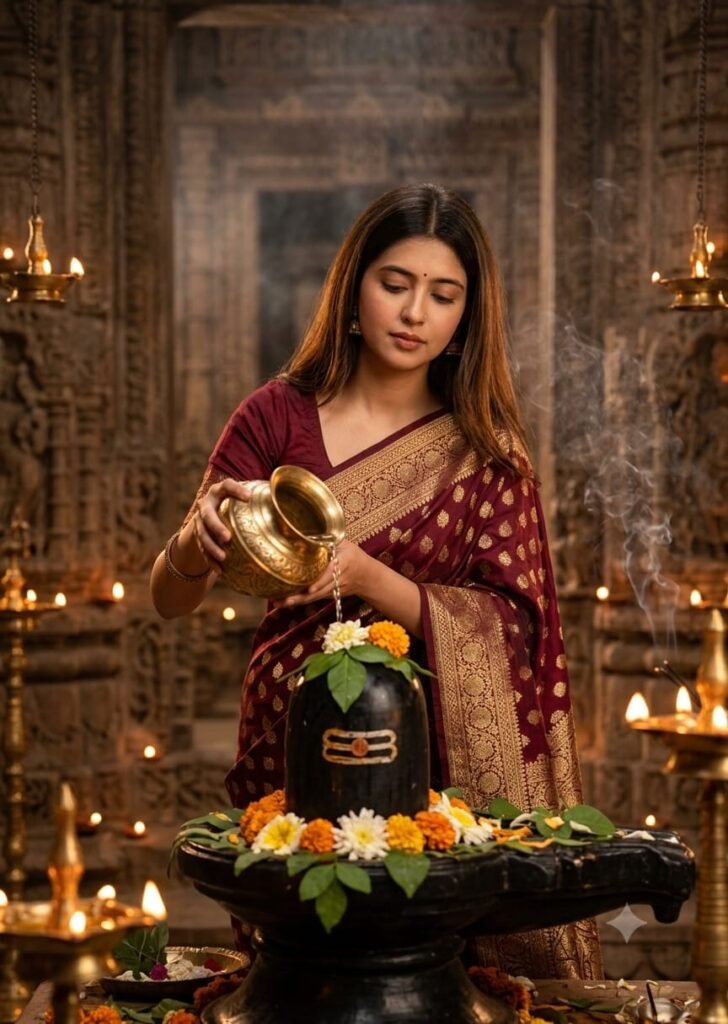
Ultra-realistic cinematic portrait of a young Indian woman performing Shiv Abhishek inside an ancient Shiva temple, wearing a deep maroon Banarasi saree with gold zari, long open hair, small bindi, pouring water from a brass kalash over a black Shiva Lingam decorated with bel leaves and flowers, warm diya lighting, incense smoke, divine spiritual atmosphere, shallow depth of field, 85mm lens, ultra-detailed, 8K.
Breaking Down the Shiv Abhishek AI Prompt
Every phrase in this prompt does specific work. Understanding each part helps you tweak it confidently later.
- “Ultra-realistic cinematic portrait” sets the overall photographic style, not an illustration or painting.
- “Deep maroon Banarasi saree with gold zari” adds authentic Indian textile detail, since Banarasi silk is traditionally worn for religious occasions.
- “Brass kalash,” “black Shiva Lingam,” and “bel leaves and flowers” keep the ritual elements accurate and recognizable.
- “Warm diya lighting” and “incense smoke” build the temple atmosphere and add natural depth.
- “Shallow depth of field, 85mm lens” mimics a real portrait lens, blurring the background while keeping the subject sharp.
- “8K, ultra-detailed” pushes the AI toward higher texture and skin detail.
Together, these phrases guide the AI toward a believable, temple-lit photograph rather than a generic digital painting.
Which AI Image Generators Work Best for This Prompt
Different tools handle photorealism and cultural detail differently. Here is how the major options compare.
| AI Tool | Realism Level | Best For | Notes |
|---|---|---|---|
| Midjourney | Very high | Cinematic lighting, skin texture | Handles camera terms like “85mm lens” exceptionally well |
| Google Gemini | High | Quick generation, easy access | Good for fast drafts and edits |
| ChatGPT (image generation) | Good | Prompt accuracy | Sometimes softer on realism |
| Leonardo AI | High | Free credits, fine detail control | Strong for portrait upscaling |
Overall, Midjourney tends to produce the most cinematic result for this specific prompt. However, Gemini works well if you want a faster, no-cost option.
Step-by-Step: How to Use This Shiv Abhishek AI Prompt
- Choose your AI image generator from the table above.
- Paste the prompt exactly, or adjust small details like saree color.
- Set the aspect ratio to portrait, ideally 4:5 or 3:4.
- Generate the image and review all four variations if offered.
- Upscale your favorite version for higher resolution.
- Zoom in on hands and the Lingam shape to check for errors.
- Regenerate that section if anything looks distorted.
- Download the final ultra-realistic portrait.
Tips for More Authentic Devotional AI Portraits
- Keep the bel leaves and kalash details specific, since vague prompts often produce generic props.
- Use a portrait aspect ratio so the temple background does not feel cropped.
- Mention “soft water stream” if you want the pouring motion to look natural.
- Avoid stacking too many style keywords, since it can confuse the lighting mood.
- Always double-check hand anatomy, which remains a common AI weak point.
Common Mistakes to Avoid
- Skipping aspect ratio settings, which leads to awkward cropping
- Ignoring lighting keywords, resulting in a flat, flash-lit look
- Accepting distorted Lingam shapes without regenerating
- Using low-resolution export settings after generation
- Forgetting to review extra fingers or blurred jewelry details
Key Takeaways
- This Shiv Abhishek AI prompt combines ritual accuracy with real camera language.
- Midjourney and Gemini currently produce the most realistic results.
- Portrait aspect ratio and lighting keywords matter more than most people expect.
- Always check hands and the Lingam shape before finalizing your image.
- This trend peaks around Maha Shivratri, Sawan month, and Mondays.
Conclusion
Creating a divine, photo-realistic devotional portrait no longer requires a studio or a real temple visit. With this Shiv Abhishek AI prompt, you can generate a cinematic, spiritually rich image in minutes. Copy the prompt below, try it in your preferred AI tool, and explore more devotional AI prompts on our blog.
What does the Shiv Abhishek AI prompt actually create?
It generates an ultra-realistic portrait of a woman performing the Shiv Abhishek ritual inside a temple, complete with traditional attire and lighting.
Which AI tool gives the most realistic result?
Midjourney generally produces the most cinematic, photo-realistic version, especially with camera terms like “85mm lens” included.
Can I change the saree color or setting in this prompt?
Yes. You can swap details like saree color or lighting style while keeping the core ritual elements intact.
Why do AI images sometimes show distorted hands?
Hands remain a known challenge for AI image models. Reviewing and regenerating that area usually fixes it.
Links
- Chat GPThttps://chatgpt.com/
- Google Gemini official page — use as a reference for the alternative AI image generation option.